
Controllers and Receivers: The Brain and Its Outposts
Posted by SFL Designs on Nov 14th 2026
Back in October we introduced xLights to the controller in software: names, outputs, channel math. But we never opened the box. This morning we do, because the controller is the hardest-working piece of hardware in your yard and the one beginners understand least.
What the controller actually does
The controller is a translator and a traffic director in one box. It does not store your show; the player does that. The controller listens to the show data coming over the network and turns it into the exact electrical conversation pixels speak: pixel one, here is your color; pixel two, yours; pixel three, yours, hundreds of times a second, without ever mixing up the order.
That speed matters. A pixel string is a line of listeners who can only hear the instruction shouted down the wire in order. The controller is the one doing the shouting, calmly, precisely, all night long.
Many controllers also hand out the power for their strings, through fused ports (a fuse being the cheap part that sacrifices itself if a short tries to pull too much current). So the box is brain and power counter both: data in, instructions and fed strings out.
Ports are doors, not props
Each socket on the controller is a port (we called them outputs in October; same doors). One port feeds one run: a string of pixels wired in a line. Props can chain together on a single run, so one port might carry three arches wired end to end, lighting all three as one string.
This is the mix-up that costs beginners money, so say it plainly: ports are not props. A controller with sixteen ports is not a sixteen-prop controller. It is a controller with sixteen doors, and each door can feed a run made of one prop or several props chained. When you shop, you are counting doors and the size of what walks through each one.
The math: pixels per port
Every port has a practical limit, and the limit is time. The controller talks to the pixels one after another, so the more pixels on a port, the longer one full round of instructions takes. String too many together and the show's frame rate (how many times per second the whole picture updates) starts to sag, and smooth motion starts to step.
Several hundred pixels per port is normal, comfortable territory for common bullet pixels. Around 700 to 800 per port is about the ceiling if you want to stay near a smooth 40 updates per second; past that you trade smoothness for string length, and fast chases show the trade.
In practice, power often caps you before data does. A port can only feed so much current through its fuse, and a long hungry run will hit the power wall first, and that is fine: last Saturday morning's lesson was built for exactly this. You inject power along the run and let the port's data keep traveling. Data decides how far a port reaches smoothly; injection decides how far it reaches brightly.
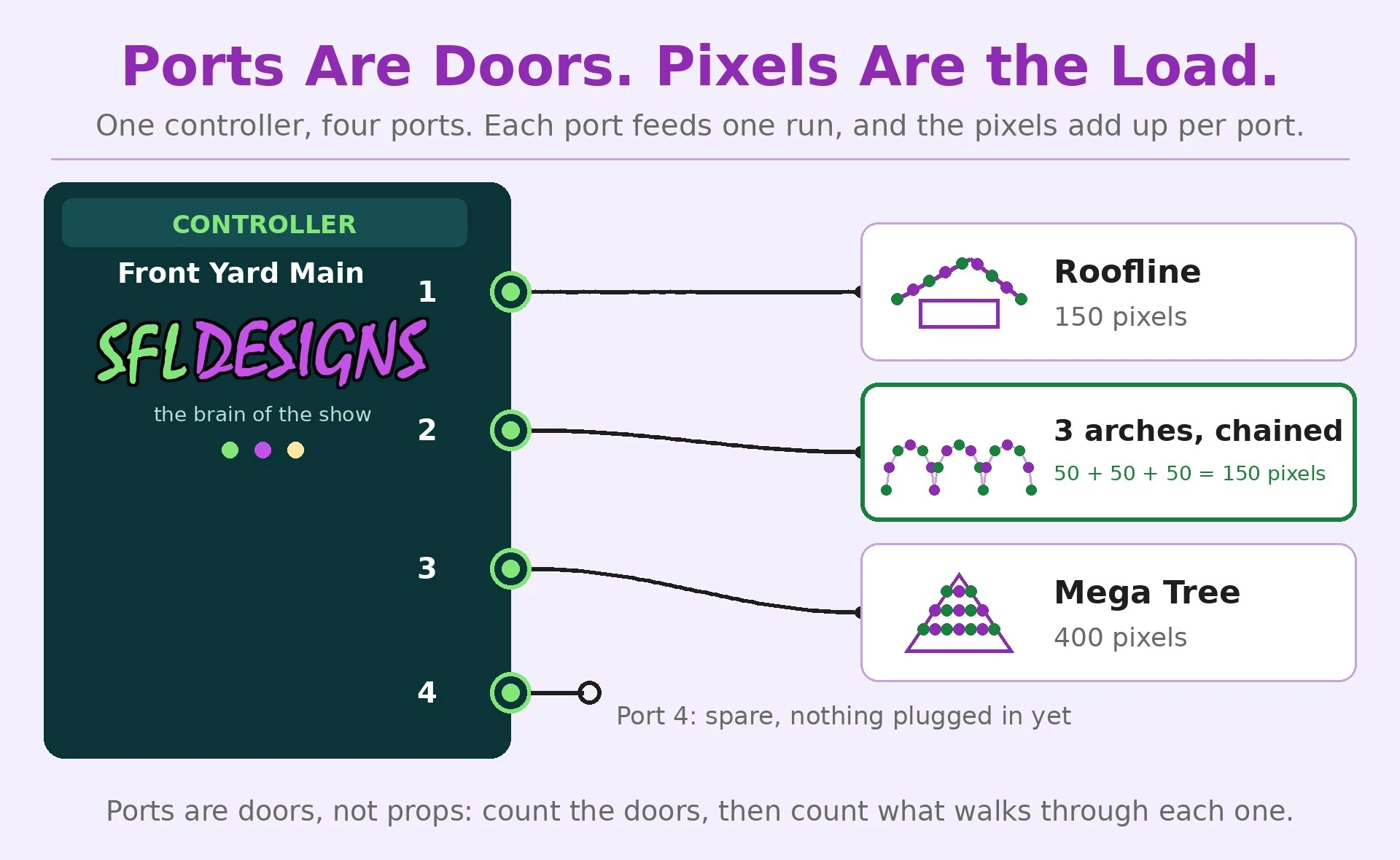
Shop note: Before you close the controller lid for the season, tape a port map inside it: port number, what it feeds, how many pixels, which fuse. Then take a photo of the wired box with your phone. In December, in the dark, with cold fingers, that photo is worth more than your memory of October. Ask anyone who has troubleshot by flashlight and vibes.
Receivers: the outposts
Now the distance problem. Say your controller sits by the garage, and a cluster of props lives clear across the yard. Pixel data does not love long trips: run the string cables too far and the instructions arrive tired and garbled, showing up as flicker and random colors.
The fix is a receiver board, sometimes called a differential receiver. The controller sends the data in a tougher, paired form (the differential part, built to shrug off distance and electrical noise) over one long network-style cable to a small receiver parked beside the distant props. The receiver translates it back into pixel talk and feeds a few short, local ports. One long cable crosses the yard instead of four long, unhappy string runs.
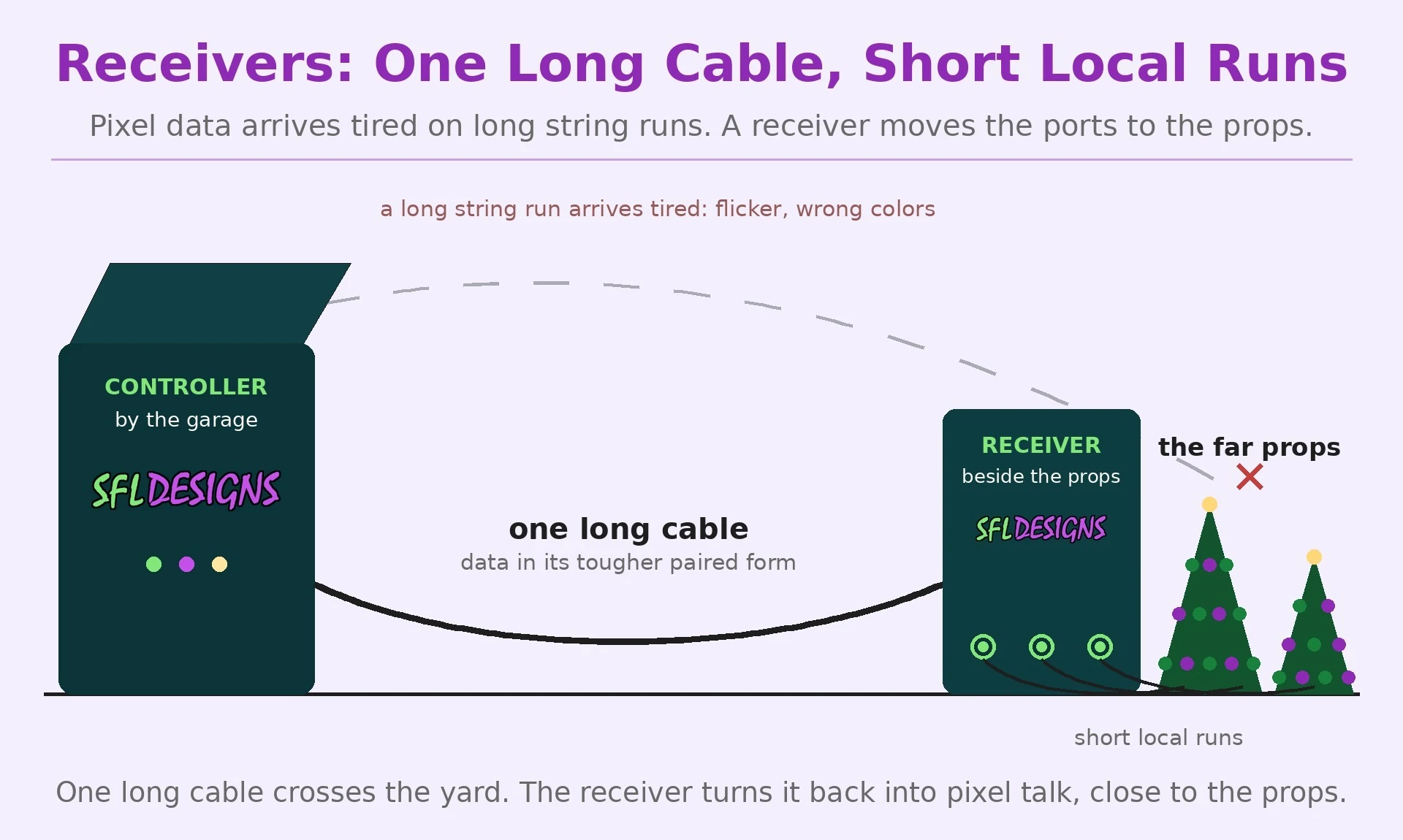
A receiver earns its keep when a prop cluster is far from the box, when the layout would force long pixel leads, or when you want the wiring near a prop short and tidy. If everything sits within a comfortable run of the controller, you may never need one. The moment the show spreads out, you will wonder how you lived without them.
The five names on the shelf
Our stack here is Genius, Kulp, Vivid, Baldrick, and Falcon, and the honest truth is that all five do the same core job: eat show data, feed pixels, night after night. They differ in their receiver families, their mounting habits, and the communities that know them best.
- Falcon is one of the longest-running names in the hobby, with a deep receiver ecosystem and a lot of shows on it.
- Kulp boards are built around a small computer brain and run the show software right on the controller.
- Genius is a newer family a lot of displays have moved to in recent seasons, with receivers of its own.
- Vivid is a smaller name in the same game; you will see their boards in show tours and vendor booths.
- Baldrick comes from the Build a Light Show crew, boards built by people who run big displays themselves.
Pick the ecosystem that fits your yard. Around here we mount all of them. The brand matters less than knowing what the box does, and now you do.
This afternoon we put those ports to work: your first sequence, where the models from October finally get a song and something to dance to.
— Jason, SFL Designs
From our workbench to your display — print it, mount it, light it up.