
Tell xLights Where the Brain Lives: Controller Setup and Uploading Output
Posted by SFL Designs on Oct 24th 2026

This morning you picked pixels: shapes, spacings, and numbers for every prop. This afternoon those numbers meet the brain.
Because here is the beginner trap nobody warns you about. You can build a perfect layout in xLights (last Saturday afternoon, we did), hang beautiful models on your house preview, and still light nothing, because xLights does not yet know one thing: which controller is actually out in the yard running the show, and which of its outputs each prop is plugged into. Today we tell it.
The one idea: outputs are addresses
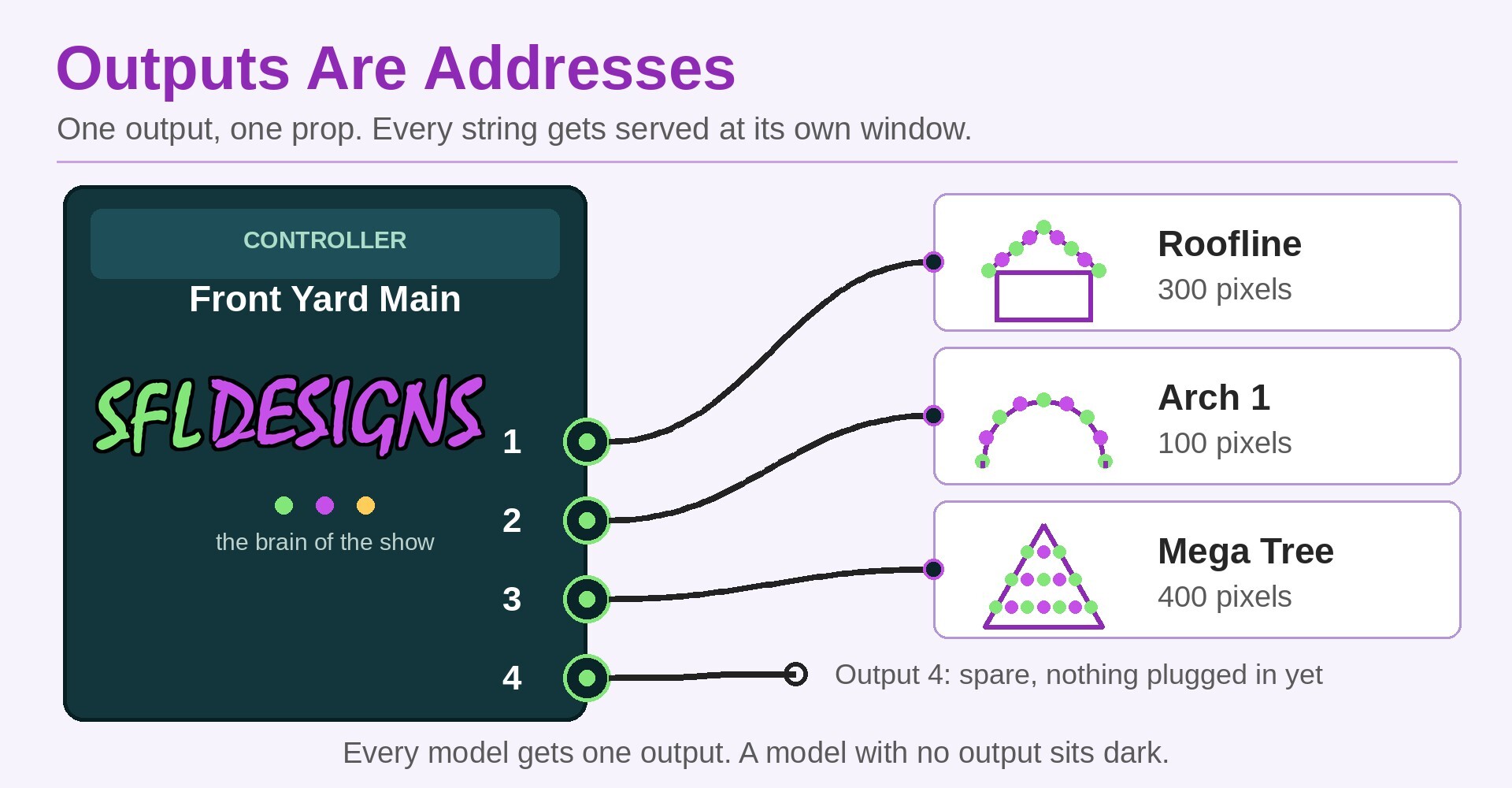
A controller has outputs (also called ports): the sockets the pixel strings plug into. Think of the controller as a small post office. Each output is a counter window, and every pixel string has to be served at exactly one window.
Your job in xLights is introductions. This model (say, the left arch, 100 pixels) will be served at output 3 of the front-yard controller. This model (the roofline, 300 pixels) goes to output 1. You do that once, in the software, and from then on xLights knows where every light in your show physically lives.
Step one: introduce the controller
In xLights, you add your controller as a device on your show network: its kind, its name, and its address on the network. Give it a name a tired human understands at midnight ("Front Yard Main" beats "Controller 2 Copy Final"). One controller per box in the yard. If your show grows a second box later, it gets its own introduction the same way.
Two habits pay for themselves here. Name things for where they live, not what they are. And add the controller you actually own, at the address it will actually use, not a placeholder you mean to fix later. Later never comes; December does.
Step two: hand the models to the outputs
Next, each model gets assigned to an output on that controller. Work in the same order the strings will plug in on build day, top to bottom, and the software list will match the physical box when you are standing in the yard with a flashlight.
This assignment is also where your pixel counts from this morning stop being shopping numbers and become the show's wiring diagram. A model that is not assigned anywhere is a prop that will sit dark no matter how good the sequence is, so the pass is simple: every model, one output, no orphans.
Step three: let xLights do the channel math
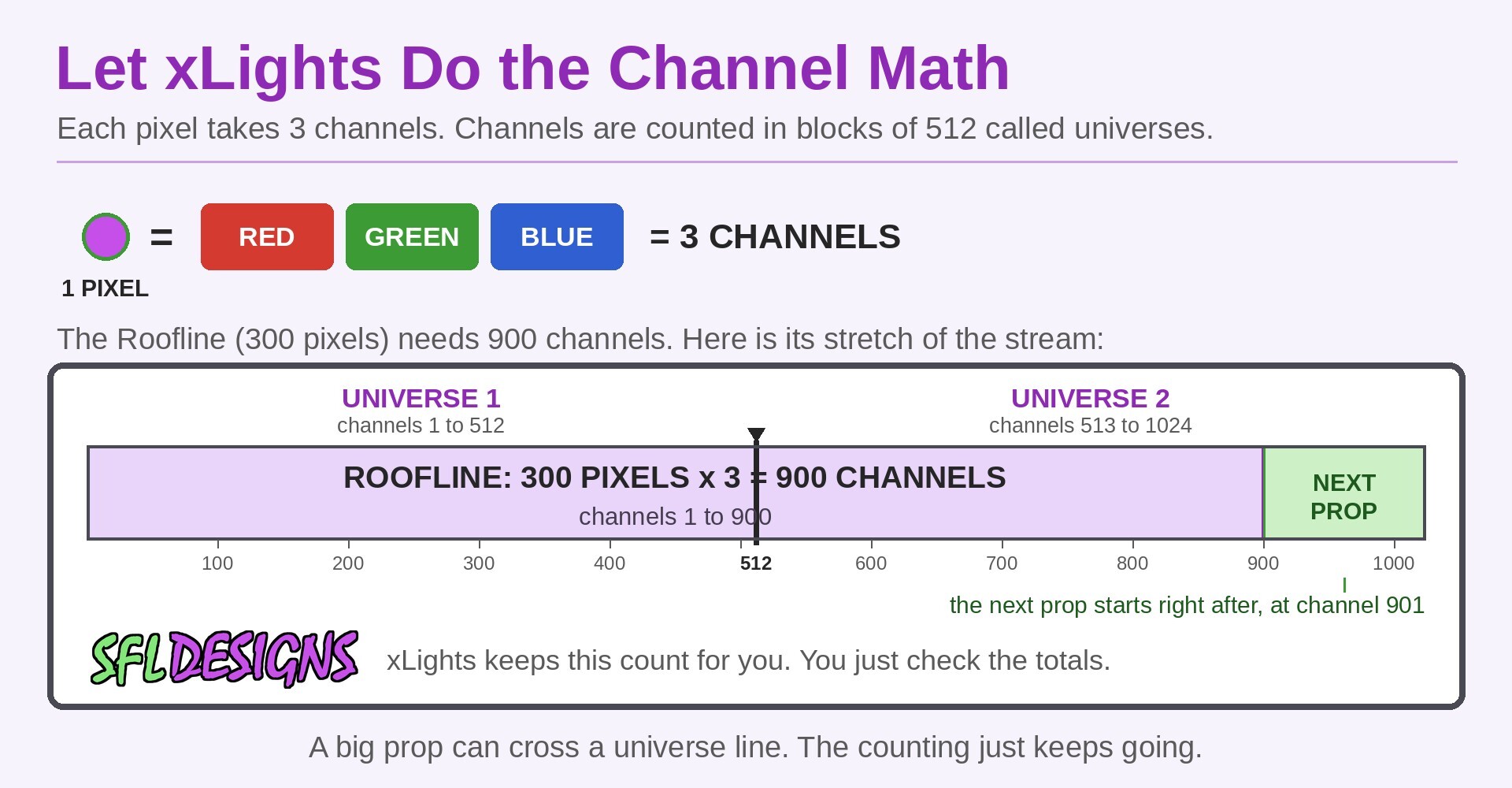
Now the part beginners brace for, and the part you can relax about. Behind the outputs, the data stream is counted in channels: each pixel takes three channels (one each for red, green, and blue), and the stream is bundled into blocks of 512 channels called universes. Doing that arithmetic by hand for a whole house is a spreadsheet evening with real chances to be wrong.
Do not do it by hand. Once the models sit on outputs, xLights counts for you: how many pixels on this output, where the next output's counting starts, which universes each string crosses. Your job is to check its work the way you would check a receipt: pixel counts match the props, no output is asked to carry more pixels than it or the controller can handle, and the totals match the yard you drew.
Shop note: Save a copy of the layout right after controller setup, with the date in the file name, before you change one more thing. Controller day is the day your layout becomes real, and the version from today is the one you will wish you had the first time an experiment scrambles the counting. A saved copy costs ten seconds and one folder.
Step four: send it to the brain
Last, xLights can push this setup out to the controller itself (the upload step), so the box in the yard and the layout on your screen agree: same outputs, same counts, same order. Run it, then do the test that matters more than any screen: plug one string into output 1, run a simple test pattern, and watch the real prop answer. Software that agrees with the yard is the whole goal.
That is the brain, introduced and employed. Your layout from last week now has somewhere to send its orders, and the pixels from this morning have windows to be served at. Next Saturday morning we feed the whole thing properly (power supplies, sized like we mean it), and that afternoon we run the bars test, the lie detector that proves this layout is telling the truth before anyone sequences a single note.
— Jason, SFL Designs
From our workbench to your display — print it, mount it, light it up.